

Neo4j Browser — the tool most of our customers relied on for quick, no-setup access to their databases — has been officially discontinued for some time now, and receives only limited support. We didn’t want that to leave anyone without a fast way to connect to their data, so we set out to build a replacement.
While we were building it, though, we saw the chance to do more than replace what was being lost. We could add capabilities Neo4j Browser never had — like querying without knowing Cypher, or sharing results with the rest of your team, not just running them yourself.

Today we’re excited to introduce GDB Explorer.
You can launch it from any database in your Organization — there’s a link on every database’s Overview page that pre-fills the connection details, so you only need to enter your credentials. Prefer to explore first? Connect to our read-only test database and try it out with sample data before pointing it at your own.
Query without writing Cypher
The Cypher Designer is a click-based way to build a query without knowing the Cypher language. Match the path you want to filter, choose what to return, sort it, and cap how many rows come back — all visually, with your database’s schema (labels, relationship types, properties) right there to pick from.
Or write it yourself
Prefer Cypher? The Editor is a free-form, syntax-highlighted text input for any query. Right-click to run it, or run it as a profile to see exactly how the database executes it — a heat-colored tree of operators showing estimated rows, produced rows, memory used and database hits, so you can spot the expensive part of a query at a glance.
Save and share your queries
A View is a query together with its visualization options — which columns to show, and in which order. Save one and share it with anyone who can connect to the same database, so your team can revisit the same results without rebuilding the query from scratch.
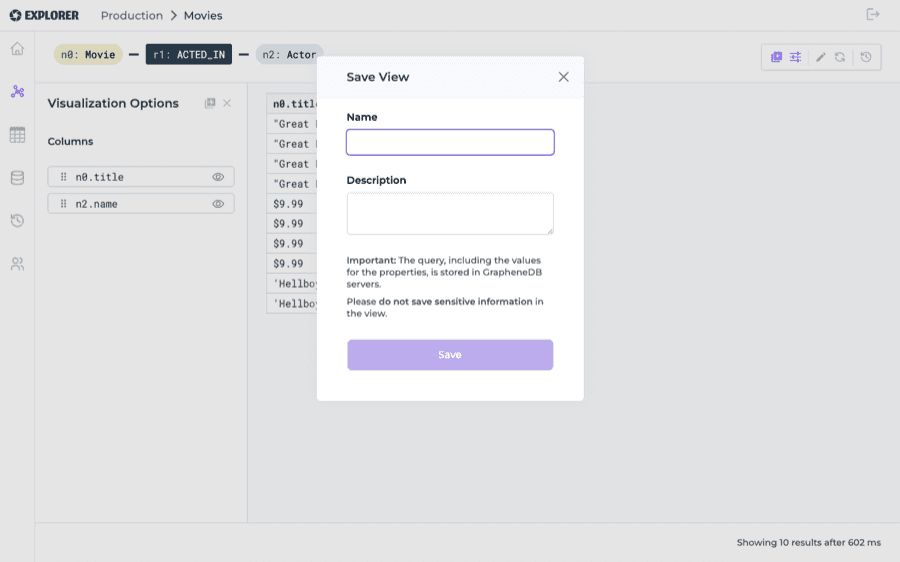
Every query you run also lands in your history, so picking up where you left off — or handing a query off to a teammate — doesn’t mean writing it again.
Available now
GDB Explorer is available today from the Console — no installation, nothing to configure. Head to any database’s Overview page and click Explorer, or use the link in the sidebar to connect to any database in your Organization.
You can read more about what it can do in the Explorer docs.
If you have feedback or questions, we’d love to hear from you.